WKWebView 简介
WKWebView 是苹果在 iOS 8 中引入的新组件,目的是给出一个新的高性能的 WebView 解决方案,解决之前 UIWebView 加载速度慢、占用内存大的问题。
WKWebView 采用跨进程方案,Nitro JavaScript 解析器,高达 60fps 的刷新率,理论上性能和 Safari 比肩,而且对 H5 的高度支持,还提供了一个准确的加载进度值属性。
WKWebView 使用
WKWebView 和 UIWebView 二者在使用上差不多
1
2
3
4
5
6
7
8
9
10
11
12
13
14
15
16
17
18
19
| WKWebView *webView = [[WKWebView alloc] init];
// UI代理
webView.UIDelegate = self;
// 导航代理
webView.navigationDelegate = self;
// 是否允许手势左滑返回上一级
webView.allowsBackForwardNavigationGestures = YES;
//刷新当前页面
[webView reload];
//页面后退
[webView goBack];
//页面前进
[webView goForward];
//可返回的页面列表, 存储已打开过的网页
WKBackForwardList * backForwardList = [webView backForwardList];
//加载网页链接
NSURLRequest *request = [NSURLRequest requestWithURL:[NSURL URLWithString:@"https://www.jianshu.com/u/0b4dffea819d"]];
[webView loadRequest:request];
|
- WKWebViewConfiguration 为添加WKWebView配置信息
1
2
3
4
5
6
7
8
9
10
11
12
13
14
15
16
17
18
19
20
21
22
| WKWebViewConfiguration *config = [[WKWebViewConfiguration alloc] init];
// 创建设置对象
WKPreferences *preference = [[WKPreferences alloc]init];
//最小字体大小 当将javaScriptEnabled属性设置为NO时,可以看到明显的效果
preference.minimumFontSize = 0;
//设置是否支持javaScript 默认是支持的
preference.javaScriptEnabled = YES;
// 在iOS上默认为NO,表示是否允许不经过用户交互由javaScript自动打开窗口
preference.javaScriptCanOpenWindowsAutomatically = YES;
config.preferences = preference;
// 是使用h5的视频播放器在线播放, 还是使用原生播放器全屏播放
config.allowsInlineMediaPlayback = YES;
//设置视频是否需要用户手动播放 设置为NO则会允许自动播放
config.requiresUserActionForMediaPlayback = YES;
//设置是否允许画中画技术 在特定设备上有效
config.allowsPictureInPictureMediaPlayback = YES;
//设置请求的User-Agent信息中应用程序名称 iOS9后可用
config.applicationNameForUserAgent = @"ChinaDailyForiPad";
WKWebView *webView = [[WKWebView alloc] initWithFrame:CGRectMake(0, 0, SCREEN_WIDTH, SCREEN_HEIGHT) configuration:config];
|
1
2
3
4
5
6
7
8
9
10
11
12
13
14
15
16
| #pragma mark - WKNavigationDelegate
//载入 URL之前的一次调用,询问是否下载并载入当前 URL
//在 URL 下载完毕之后还会发一次询问,根据服务器返回的 Web 内容再次做一次确定。
- (void)webView:(WKWebView *)webView decidePolicyForNavigationAction:(WKNavigationAction *)navigationAction decisionHandler:(void (^)(WKNavigationActionPolicy))decisionHandler { }
// 根据客户端受到的服务器响应头以及response相关信息来决定是否可以跳转
- (void)webView:(WKWebView *)webView decidePolicyForNavigationResponse:(WKNavigationResponse *)navigationResponse decisionHandler:(void (^)(WKNavigationResponsePolicy))decisionHandler { }
//同意载入之后,组件就开始下载指定 URL 的内容,在下载之前会调用一次 开始下载 回调,通知开发者 Web 已经开始下载。
- (void)webView:(WKWebView *)webView didStartProvisionalNavigation:(null_unspecified WKNavigation *)navigation { }
// 当内容开始返回时调用
- (void)webView:(WKWebView *)webView didCommitNavigation:(null_unspecified WKNavigation *)navigation { }
//页面下载完毕之后 WKWebView 会发询问,确定下载的内容被允许之后再载入视图。
- (void)webView:(WKWebView *)webView didFinishNavigation:(null_unspecified WKNavigation *)navigation { }
//整个流程有错误发生都会发出错误回调
- (void)webView:(WKWebView *)webView didFailProvisionalNavigation:(null_unspecified WKNavigation *)navigation withError:(NSError *)error { }
//提交发生错误时调用
- (void)webView:(WKWebView *)webView didFailNavigation:(null_unspecified WKNavigation *)navigation withError:(NSError *)error {}
|
1
2
3
4
5
6
7
8
9
10
11
12
| //重定向通知,在收到服务器重定向消息并且跳转询问允许之后,会回调重定向方法
- (void)webView:(WKWebView *)webView didReceiveServerRedirectForProvisionalNavigation:(null_unspecified WKNavigation *)navigation { }
//需要响应身份验证时调用 同样在block中需要传入用户身份凭证
- (void)webView:(WKWebView *)webView didReceiveAuthenticationChallenge:(NSURLAuthenticationChallenge *)challenge completionHandler:(void (^)(NSURLSessionAuthChallengeDisposition disposition, NSURLCredential * _Nullable credential))completionHandler{
//用户身份信息
NSURLCredential * newCred = [[NSURLCredential alloc] initWithUser:@"user" password:@"pwd" persistence:NSURLCredentialPersistenceNone];
//为 challenge 的发送方提供 credential
[challenge.sender useCredential:newCred forAuthenticationChallenge:challenge];
completionHandler(NSURLSessionAuthChallengeUseCredential,newCred);
}
//进程被终止时调用
- (void)webViewWebContentProcessDidTerminate:(WKWebView *)webView{ }
|
- WKUIDelegate
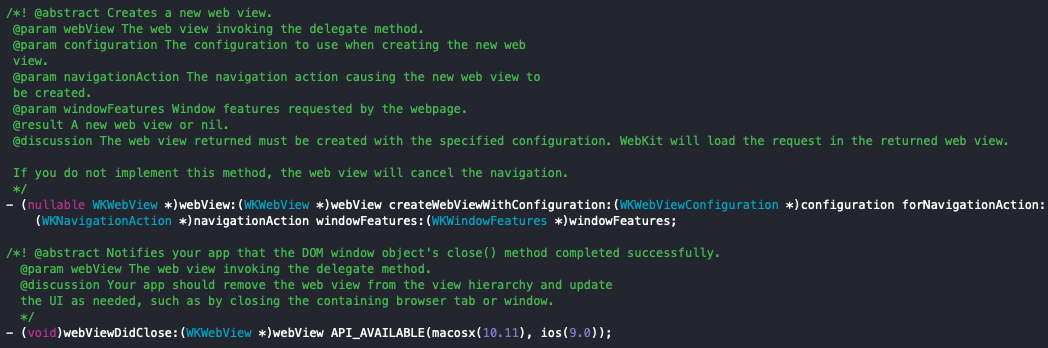
对于类似 ‘A’ 标签 ‘target=_blank’ 这种情况,会要求创建一个新的WKWebView 视图,这个消息的通知回调也在该协议中,不过针对 iOS 设备在当前一个视图中显示,该标签点击会没反应,所以在视图载入之后会清除掉所有的 _blank 标记。
对于类似 ‘A’ 标签 ‘target=_blank’ 这种情况,会要求创建一个新的WKWebView 视图,这个消息的通知回调也在该协议中,不过针对 iOS 设备在当前一个视图中显示,该标签点击会没反应,所以在视图载入之后会清除掉所有的 _blank 标记。
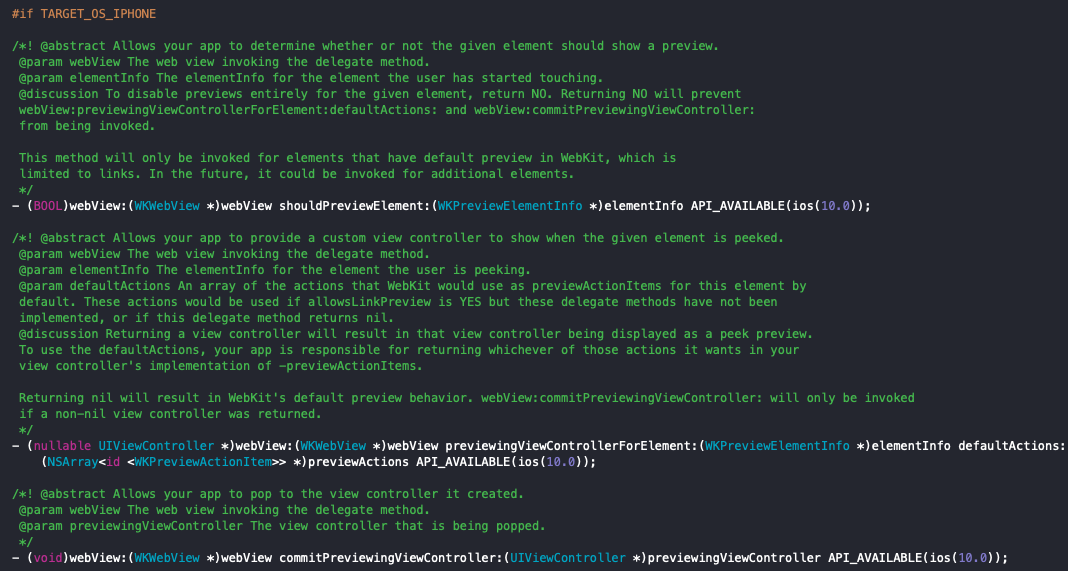
在 iOS 10 之后,新增了链接预览的支持,相关方法也在该协议中
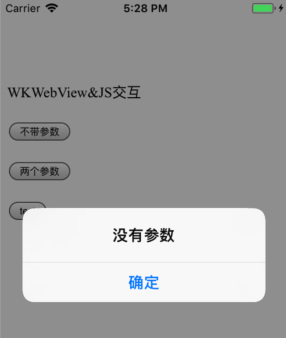
在 UIWebView中,Alert、Confirm、Prompt 等视图是直接可执行的,但在WKWebView上,需要通过 WKUIDelegate协议接收通知,然后通过 iOS 原生执行。下面代码用原生实现显示 Alert :
1
2
3
4
5
6
7
8
9
10
11
12
13
14
15
16
17
18
19
20
21
22
23
24
25
26
27
28
29
30
31
32
33
| #pragma mark -- WKUIDelegate
// 显示一个按钮。点击后调用completionHandler回调
- (void)webView:(WKWebView *)webView runJavaScriptAlertPanelWithMessage:(NSString *)message initiatedByFrame:(WKFrameInfo *)frame completionHandler:(void (^)(void))completionHandler{
UIAlertController *alertController = [UIAlertController alertControllerWithTitle:message message:nil preferredStyle:UIAlertControllerStyleAlert];
[alertController addAction:[UIAlertAction actionWithTitle:@"确定" style:UIAlertActionStyleCancel handler:^(UIAlertAction * _Nonnull action) {
completionHandler();
}]];
[self presentViewController:alertController animated:YES completion:nil];
}
// 显示两个按钮,通过completionHandler回调判断用户点击的确定还是取消按钮
- (void)webView:(WKWebView *)webView runJavaScriptConfirmPanelWithMessage:(NSString *)message initiatedByFrame:(WKFrameInfo *)frame completionHandler:(void (^)(BOOL))completionHandler{
UIAlertController *alertController = [UIAlertController alertControllerWithTitle:message message:nil preferredStyle:UIAlertControllerStyleAlert];
[alertController addAction:[UIAlertAction actionWithTitle:@"确定" style:UIAlertActionStyleDefault handler:^(UIAlertAction * _Nonnull action) {
completionHandler(YES);
}]];
[alertController addAction:[UIAlertAction actionWithTitle:@"取消" style:UIAlertActionStyleCancel handler:^(UIAlertAction * _Nonnull action) {
completionHandler(NO);
}]];
[self presentViewController:alertController animated:YES completion:nil];
}
// 显示一个带有输入框和一个确定按钮的,通过completionHandler回调用户输入的内容
- (void)webView:(WKWebView *)webView runJavaScriptTextInputPanelWithPrompt:(NSString *)prompt defaultText:(NSString *)defaultText initiatedByFrame:(WKFrameInfo *)frame completionHandler:(void (^)(NSString * _Nullable))completionHandler{
UIAlertController *alertController = [UIAlertController alertControllerWithTitle:@"" message:nil preferredStyle:UIAlertControllerStyleAlert];
[alertController addTextFieldWithConfigurationHandler:^(UITextField * _Nonnull textField) {}];
[alertController addAction:[UIAlertAction actionWithTitle:@"确定" style:UIAlertActionStyleDefault handler:^(UIAlertAction * _Nonnull action) {
completionHandler(alertController.textFields.lastObject.text);
}]];
[self presentViewController:alertController animated:YES completion:nil];
}
|
alert 显示如下:
1
2
3
4
5
6
7
8
9
10
11
12
13
14
15
16
17
18
19
20
21
22
23
| //添加监测网页加载进度的观察者
[self.webView addObserver:self forKeyPath:@"estimatedProgress" options:0 context:nil];
//添加监测网页标题title的观察者
[self.webView addObserver:self forKeyPath:@"title" options:NSKeyValueObservingOptionNew context:nil];
//kvo 监听进度
-(void)observeValueForKeyPath:(NSString *)keyPath ofObject:(id)object change:(NSDictionary<NSKeyValueChangeKey,id> *)change context:(void *)context{
if ([keyPath isEqualToString:NSStringFromSelector(@selector(estimatedProgress))] && object == webView) {
//网页加载进度
self.progressView.progress = webView.estimatedProgress;
if (webView.estimatedProgress >= 1.0f) {
dispatch_after(dispatch_time(DISPATCH_TIME_NOW, (int64_t)(0.3 * NSEC_PER_SEC)), dispatch_get_main_queue(), ^{ self.progressView.progress = 0; });
}
}else if([keyPath isEqualToString:@"title"] && object == webView){
self.navigationItem.title = webView.title;
}else{
[super observeValueForKeyPath:keyPath ofObject:object change:change context:context];
}
}
//移除观察者
[_webView removeObserver:self forKeyPath:NSStringFromSelector(@selector(estimatedProgress))];
[_webView removeObserver:self forKeyPath:NSStringFromSelector(@selector(title))];
|
WKWebView与JS的交互
在 iOS 6 之前,UIWebView 是不支持共享对象的,Web 端需要通知 Native,需要通过修改 location.url,利用跳转询问协议来间接实现,通过定义 URL 元素组成来规范协议
在 iOS 7 之后新增了 JavaScriptCore 库,内部有一个 JSContext 对象,可实现共享
而 WKWebView 上,Web 的 window 对象提供 WebKit 对象实现共享
而 WKWebView 绑定共享对象,是通过特定的构造方法实现,参考代码,通过指定 UserContentController 对象的 ScriptMessageHandler 经过 Configuration 参数构造时传入
而 handler 对象需要实现指定协议,实现指定的协议方法,当 JS 端通过 window.webkit.messageHandlers 发送 Native 消息时,handler 对象的协议方法被调用,通过协议方法的相关参数传值
首先需要在 JS 方法中调用,可以传递一些参数:
1
2
3
4
5
6
| function btnClick1() {
window.webkit.messageHandlers.showMessage1.postMessage(null);
}
function btnClick2() {
window.webkit.messageHandlers.showMessage2.postMessage(['两个参数One', '两个参数Two']);
}
|
OC 中的代码,获取 JS 的消息:
1
2
3
4
5
6
7
8
9
10
11
12
| // 设置偏好设置
WKWebViewConfiguration *config = [[WKWebViewConfiguration alloc] init];
config.preferences.minimumFontSize = 10;
//是否支持JavaScript
config.preferences.javaScriptEnabled = YES;
//不通过用户交互,是否可以打开窗口
config.preferences.javaScriptCanOpenWindowsAutomatically = NO;
WKUserContentController *userCC = config.userContentController;
//添加消息处理的handler的name
[userCC addScriptMessageHandler:self name:@"showMessage1"];
[userCC addScriptMessageHandler:self name:@"showMessage2"];
|
当 JS 调用方法时,代理方法就会调用:
1
2
3
4
5
6
7
8
9
10
11
12
13
14
15
16
17
18
19
| #pragma mark - WKScriptMessageHandler
- (void)userContentController:(WKUserContentController *)userContentController didReceiveScriptMessage:(WKScriptMessage *)message {
if ([message.name isEqualToString:@"showMessage1"]) {
//没有参数
}
if ([message.name isEqualToString:@"showMessage2"]) {
NSArray *array = message.body;
NSString *info = [NSString stringWithFormat:@"有两个参数: %@, %@ !!",array.firstObject,array.lastObject];
}
}
-(void)removeAllScriptMsgHandle{
WKUserContentController *controller = self.webView.configuration.userContentController;
[controller removeScriptMessageHandlerForName:@"showMessage1"];
[controller removeScriptMessageHandlerForName:@"showMessage2"];
}
|
1
| [webView evaluateJavaScript:@"showAlert('一个弹框')" completionHandler:^(id item, NSError * _Nullable error) { }];
|
注入 JS 方法:
1
2
3
4
| NSString *jsString = @"function getMessage() { alert('abcd');} ";
WKUserScript *noneSelectScript = [[WKUserScript alloc] initWithSource:jsString injectionTime:WKUserScriptInjectionTimeAtDocumentStart forMainFrameOnly:NO];
// 将自定义JS加入到配置里
[userCC addUserScript:noneSelectScript];
|
写了个小例子,有兴趣的可以参考一下:
https://github.com/MA806P/MYZWebHybrid
Reference
https://juejin.im/entry/5975916e518825594d23d777
https://www.jianshu.com/p/403853b63537