前言 本篇文章总结一下在 iOS 开发中关于时间、日期的一些知识点。阅读本文你将会看到有关,NSDate、NSDateFormatter、NSTimeZone、NSLocale 、NSDateComponents、NSCalendar 的使用。
开始之前先来一波科普:
全球24个时区的划分
格林威治标准时间GMT
世界协调时间UTC
NSTimeZone NSTimeZone 时区信息
1
2
3
4
5
6
7
8
9
10
11
12
13
14
15
// 创建时区 NSTimeZone *zone1 = [[NSTimeZone alloc] initWithName:@"Asia/Shanghai"]; NSTimeZone *zone2 = [NSTimeZone timeZoneWithName:@"Asia/Shanghai"]; // 根据时区缩写创建 NSTimeZone *zone4 = [NSTimeZone timeZoneWithAbbreviation:@"HKT"]; // 根据零时区的秒数偏移量创建 NSTimeZone *zone5 = [NSTimeZone timeZoneForSecondsFromGMT:28800]; //Asia/Shanghai表示国内上海的时区名 //用下面的方法来获取各时区对应的名称 NSArray *nameArray = [NSTimeZone knownTimeZoneNames]; //HKT = "Asia/Hong_Kong" //用下面的方法来获取所有时区对应的缩写数据 NSDictionary *abbreviationDictionary = [NSTimeZone abbreviationDictionary];
1
2
3
4
5
6
7
8
9
10
11
//获取时区信息 // 获取系统时区 NSTimeZone *zone1 = [NSTimeZone systemTimeZone]; // 获取本地时区 NSTimeZone *zone2 = [NSTimeZone localTimeZone]; // 获取默认时区 NSTimeZone *zone3 = [NSTimeZone defaultTimeZone]; // 计算该时区与 GMT 时区的时间差 NSInteger interval = [zone secondsFromGMT];
NSLocale NSLocale 类返回本地化信息,主要体现在”语言”和”区域格式”这两个设置项。
1
2
3
4
5
6
7
8
// 用标示符创建 NSLocale *locale1 = [[NSLocale alloc] initWithLocaleIdentifier:@"zh_CN"]; // 返回系统初始本地化信息 NSLocale *locale2 = [NSLocale systemLocale]; // 一直保持在 cache 中,第一次用此方法实例化对象后,即使修改了本地化设定,也不改变 NSLocale *locale3 = [NSLocale currentLocale]; // 每次修改本地化设定,其实例化的对象也会随之改变 NSLocale *locale4 = [NSLocale autoupdatingCurrentLocale];
NSDate NSDate 用来获取时间数据
1
2
3
4
5
6
7
8
9
10
11
12
13
14
15
16
17
18
19
NSDate *date = [NSDate date]; //打印的数据:Tue Mar 13 16:37:14 2018 //获取到的是当前设备系统所在时区的时间 // 当前时间加 n 秒后的值 NSDate *date1 = [NSDate dateWithTimeIntervalSinceNow:10]; // 某个时间增加 n 秒后的值 NSDate *date2 = [NSDate dateWithTimeInterval:10 sinceDate:date1]; // 从 1970-01-01 00:00:00 (GMT) 增加 n 秒后的值 NSDate *date3 = [NSDate dateWithTimeIntervalSince1970:10]; // 从 2001-01-01 00:00:00 (GMT) 增加 n 秒后的值 NSDate *date4 = [NSDate dateWithTimeIntervalSinceReferenceDate:10]; // 未来某一个时间 NSDate *date5 = [NSDate distantFuture]; // 过去某一个时间 NSDate *date6 = [NSDate distantPast]; // 指定时间间隔 NSDate *date7 = [date dateByAddingTimeInterval:20];
1
2
3
4
5
6
7
8
9
10
11
12
13
14
15
16
//时间间隔,单位 秒 NSTimeInterval interval1 = [date timeIntervalSinceNow]; NSTimeInterval interval2 = [date2 timeIntervalSinceDate:date1]; // 该时间 与 1970-01-01 00:00:00 (GMT) 的时间间隔 NSTimeInterval interval3 = [date timeIntervalSince1970]; //有时候时间戳,可能用到毫秒值,秒转化为毫秒 uint64 timeInt = interval3 * 1000; NSLog(@"%lf %lld", interval3, timeInt); //1520996792.058798 1520996792058 // 该时间 与 2001-01-01 00:00:00 (GMT) 的时间间隔 NSTimeInterval interval4 = [date1 timeIntervalSinceReferenceDate]; // 当前时间 与 2001-01-01 00:00:00 (GMT) 的时间间 NSTimeInterval interval5 = [NSDate timeIntervalSinceReferenceDate];
1
2
3
4
5
6
7
8
9
10
11
12
13
14
15
时间的比较 NSDate *date1 = [NSDate date]; NSDate *date2 = [date1 dateByAddingTimeInterval:10]; // 判断两个时间是否相等 [date1 isEqualToDate:date2]; // 比较两个时间大小 NSComparisonResult result = [date1 compare:date2]; // 比较两个时间,返回 较早的时间 NSDate *date3 = [date1 earlierDate:date2]; // 比较两个时间,返回 较晚的时间 NSDate *date4 = [date1 laterDate:date2];
NSDateFormatter 时间格式化,用于将日期和时间从其内部表示形式转换为文本形式
1
2
3
4
5
6
7
8
9
10
NSDateFormatter *dateFormatter = [[NSDateFormatter alloc] init]; dateFormatter.dateFormat = @"yyyy-MM-dd HH:mm:ss"; dateFormatter.timeZone = [NSTimeZone timeZoneWithName:@"Asia/Shanghai"]; //NSDate 转换为 NSString NSString * nowDateStr = [dateFormatter stringFromDate:[NSDate date]]; //给定格式的日期字符串,转换为 NSDate //如果字符串格式不是dateFormat确定的格式,则返回值为空 NSDate *timeDate = [dateFormatter dateFromString:@"2018-03-13 16:20:48"];
1
2
3
4
5
6
7
8
//设置地区locale 不同,输出的时间格式也不同 NSDateFormatter *dateFormatter = [[NSDateFormatter alloc] init] dateFormatter.locale = [[NSLocale alloc] initWithLocaleIdentifier:@"en_US"]; dateFormatter.dateFormat = @"EEE MMM dd HH:mm:ss"; NSString * nowDateStr = [dateFormatter stringFromDate:[NSDate date]]; //NSLocale设置为 en_US 输出为: Tue Mar 13 19:34:53 //zh_CN 输出为:周二 3月 13 19:35:36
NSDateFormatter 常用的日期格式:
格式
输出结果
yyyy-MM-dd
2018-03-13
MM dd yyyy
03 13 2018
yyyy-MM-dd HH:mm:ss
2018-03-13 16:48:09
EEE MMM dd HH:mm:ss
周二 3月 13 19:35:36(zh_CN)
yyyy-MM-dd a HH:mm:ss EEEE
2018-03-13 下午 16:48:09 星期二(zh_CN)
yyyy-MM-dd HH:mm:ss.SSS
2018-03-13 16:48:12.319
NSDateFormatter格式化参数:
参数
含义
G
公元[时代],例如AD公元
yy、yyyy
年份, yy:年的后2位, yyyy:年 4位
MM、MMM、MMMM
月份
d、D、dd
日
EEE、EEEE
EEE:周几,中英文显示有区别,如周二、Tue
w、W
w:一年中的第几周
F
月份包含几周,以7天为一个单位来统计周,与日历上的周几无关
aa
上午、下午,AM/PM
H
时,24小时制,0-23
K
时,12小时制,0-11
m、mm
m:分,1-2位
s、ss、S
s:秒,1-2位
1
2
3
4
5
NSDateFormatter *dateFormatter = [[NSDateFormatter alloc] init]; dateFormatter.dateFormat = @"yyyy年MM月dd日 HH点mm分ss秒 'Date Test'"; NSString * nowDateStr = [dateFormatter stringFromDate:[NSDate date]]; NSLog(@" %@ ", nowDateStr); //2018年03月13日 19点35分36秒 Date Test
注意
NSCalendar、NSDateComponents NSDateComponents 封装了具体年月日、时秒分、周、季度等。将时间表示成方便使用的方式,通过 NSDateComponents 可以快速而简单地获取某个时间点对应的“年”,“月”,“日”,“时”,“分”,“秒”,“周”等信息。
1
2
3
4
5
6
7
8
9
10
11
12
NSCalendar *calendar = [[NSCalendar alloc] initWithCalendarIdentifier:NSCalendarIdentifierGregorian]; calendar.timeZone = [NSTimeZone timeZoneWithName:@"Asia/Shanghai"]; NSDateComponents *components = [calendar components: NSCalendarUnitWeekday| NSCalendarUnitMonth| NSCalendarUnitDay fromDate:nowDate]; NSInteger week = components.weekday;//周几,1-周日,2-周一,... NSInteger month = components.month; NSInteger day = components.day;
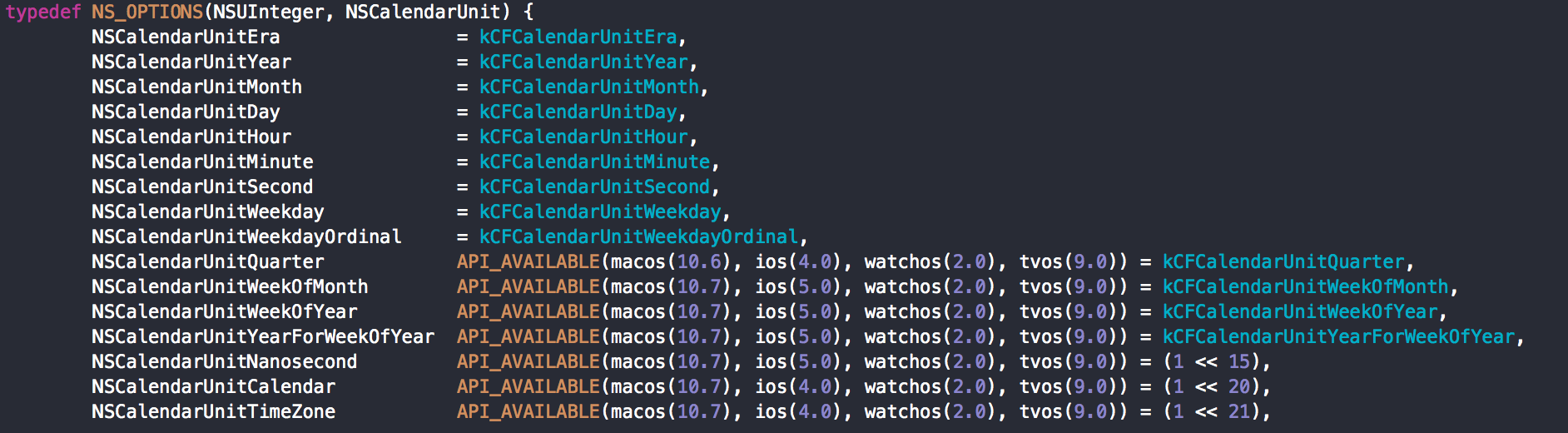
NSCalendarUnit :
Reference Date and Time Programming Guide http://userguide.icu-project.org/formatparse/datetime http://www.cnblogs.com/QianChia/p/5782780.html http://www.cnblogs.com/QianChia/p/5782780.html https://www.douban.com/note/147740972/