简介
在iOS中使用UIWindow和UIView在屏幕上显示APP的内容。UIWindow为APP提供了一个底层的容器,用来展示内容,其本身不会显示出来。而UIView可以在UIWindow这个容器里显示出某一部分的内容,你能看得见摸得着的东西基本上都是UIView,比如一个按钮、一个文本标签、一个文本输入框、一个图标等等,这些都是UIView。你可以创建不同的View去显示图片、文字,或者其他组合在一起的视图,你可以使用View去管理、组织其他的View。
在一个应用中,至少要有一个Window,一个View,来去显示应用的内容。在UIKit和其他的一些系统库中,提供了一些定义好的View供你使用,button、label、tableView等等。如果这些不能满足你的需求,也可以自己绘制View、自行获取触控事件。
UIView与CALayer
在iOS中,所有的 view 都是由一个底层的 layer 来驱动的。view 和它的 layer 之间有着紧密的联系,view 其实直接从 layer 对象中获取了绝大多数它所需要的数据。
- 每个UIView都有一个层CALayer,控制着各自在屏幕上显示的内容。
UIView真正的绘图部分,是由一个CALayer类来管理。UIView本身更像是一个CALayer的管理器,访问它的跟绘图和跟坐标有关的属性,例如frame,bounds等,实际上内部都是在访问它所包含的CALayer的相关属性。对比CALayer,UIView多了一个事件处理的功能。CALayer不能处理用户的触摸事件,而UIView可以。
- UIView内部默认有个CALayer对象(层),通过layer属性可以访问这个层。要注意的是,这个默认的层不允许重新创建,但可以往层里面添加子层
- UIView可以通过addSubview:方法添加子视图,类似地,CALayer可以通过addSublayer:方法添加子层
- UIView可以通过subviews属性访问所有的子视图,类似地,CALayer也可以通过sublayers属性访问所有的子层
- UIView可以通过superview属性访问父视图,类似地,CALayer也可以通过superlayer属性访问父层
- 可以通过CALayer修改UIView的界面属性。例如设置圆角、阴影、边框、旋转等等。
- 阴影
1 | view.layer.shadowOffset = CGSizeMake(10, 10); |
- 旋转
1 | //角度M_PI_4,(x, y, z)维度 |
- UIView是定义在UIKit框架中的。CALayer是定义在QuartzCore框架中的。CGImage、CGColor是定义在CoreGraphics框架中的。QuartzCore框架和CoreGraphics框架是可以跨平台使用的,在iOS和macOS上都能使用,但是UIKit只能在iOS中使用。为了保证可移植性,QuartzCore不能使用UIColor,只能使用CGColor。
- CALayer的 position、anchorPoint、frame、bounds 属性
position和anchorPoint属性都是CGPoint类型的
position 是 layer 相对 superLayer 坐标空间的位置,可以用来设置CALayer 在 superLayer 中的位置,它是以父层的左上角为坐标原点(0, 0)
anchorPoint称为”定位点”,它决定着 CALayer 身上的哪个点会在position 属性所指的位置。它的 x、y 取值范围都是0~1。
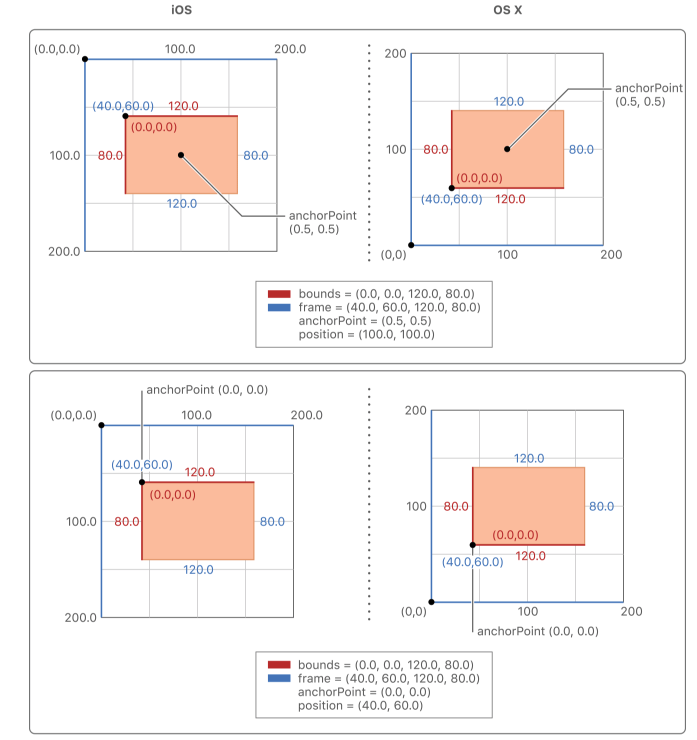
anchorPoint 默认值为(0.5, 0.5),在这种情况下,CALayer 的中心点会在 position 所指定的位置上,如下图所示:
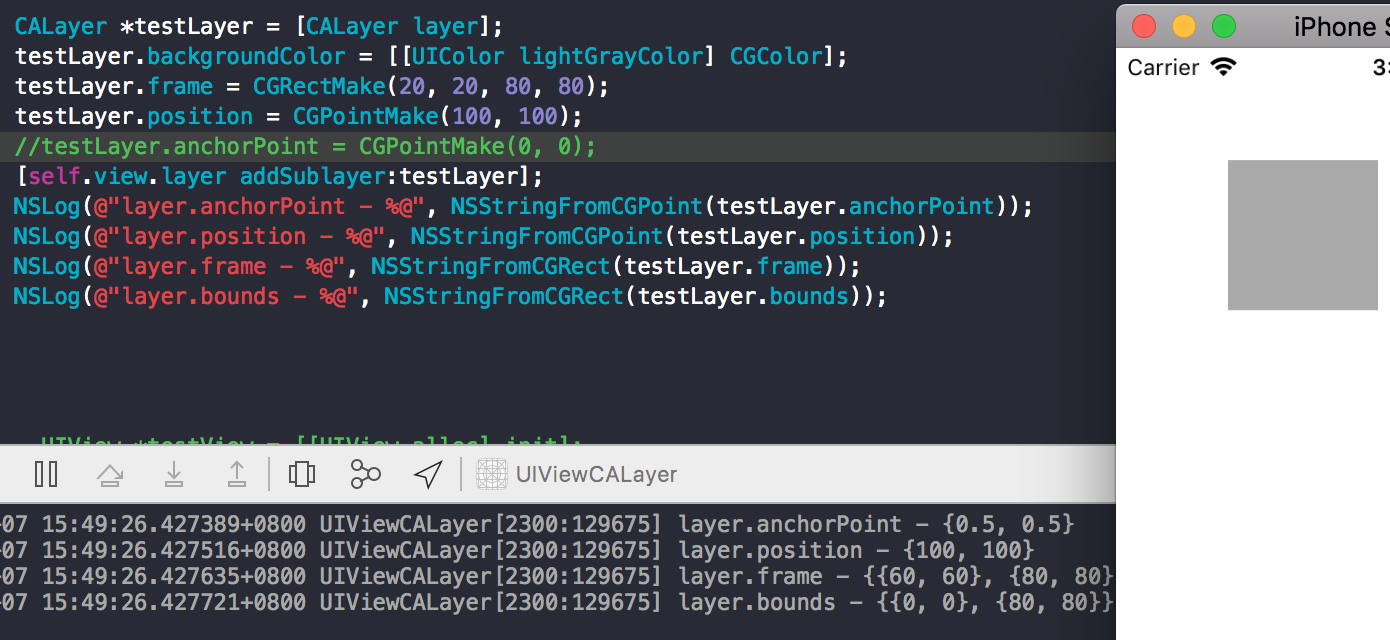
当初始化UIView时,只设置View的bounds,这种情况下视图的位置如下图:
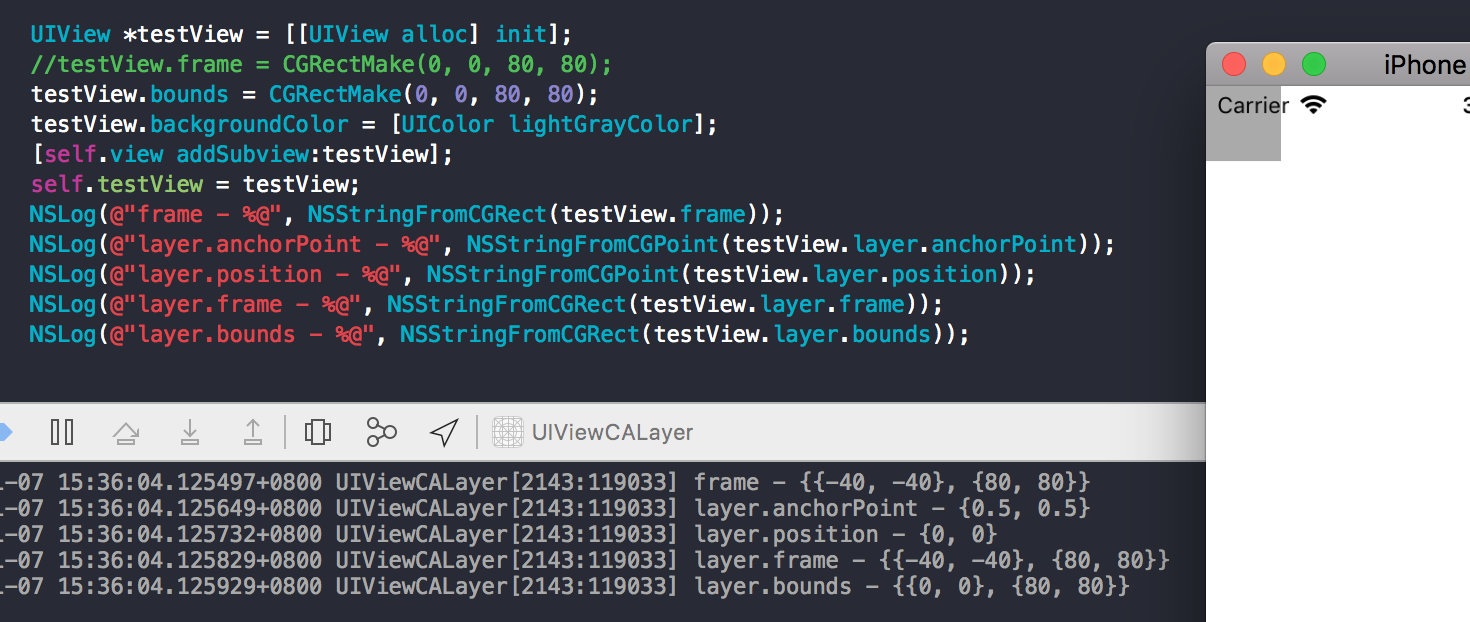
设置view的frame、bounds时候,实际上就是在设置view里对应layer的frame、bounds属性。
上面的情况设置 layer 的 bounds 为 (0, 0,80,80),由于没有设置 layer 的 frame 值,这时 anchorPoint、position 为默认值,系统会根据 layer 的 bounds、anchorPoint、position 的属性值来计算获得 frame 值,anchorPoint默认为(0.5, 0.5) ,position默认值为(0, 0)
1 | frame.origin.x = position.x - anchorPoint.x * bounds.size.width; |
所以获取到 frame 值为 (-40, -40, 80, 80),所以就呈现出图中视图的位置,x y 值为负,有一部分已经超出屏幕。
根据上面的计算方法可知,当改变 position、anchorPoint 会改变 frame 的值,改变视图的位置。
position 与 anchorPoint 的改变值互不影响。
The frame rectangle is position and size of the layer specified in the superlayer’s coordinate space. For layers, the frame rectangle is a computed property that is derived from the values in the
bounds,anchorPointandpositionproperties. When you assign a new value to this property, the layer changes itspositionandboundsproperties to match the rectangle you specified. The values of each coordinate in the rectangle are measured in points.
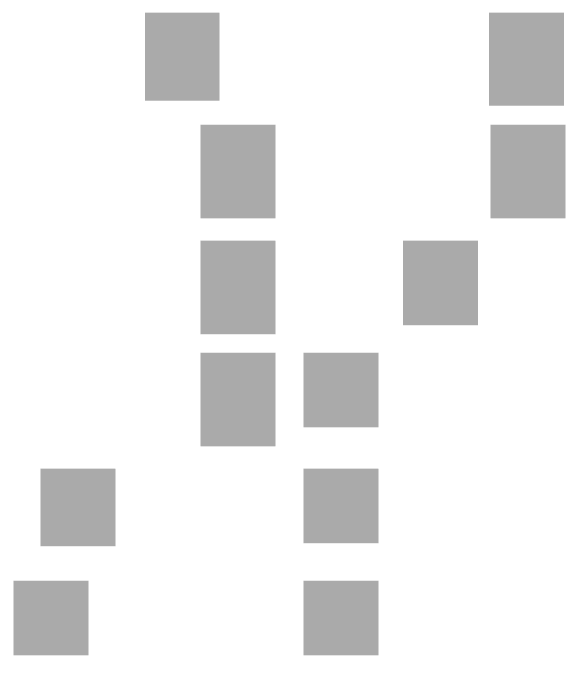
- 当对手动创建的 layer的部分属性进行相应的修改时,默认会自动产生一些动画效果。例如修改 layer 的 bounds、backgroundColor、position 是,会产生动画效果,这被称为隐式动画,layer 的可进行动画的属性值从旧值变成新值,系统所显示的过度动画。如下图上面是创建的CALayer,下面是创建的UIView,分别改变其位置和高度,对手动创建的 layer会有动画效果:
1 | - (void)viewDidLoad { |
- UIView的详细显示过程
- 当UIView需要显示时,它内部的层会准备好一个CGContextRef(图形上下文),然后调用delegate(这里就是UIView)的drawLayer:inContext:方法,并且传入已经准备好的CGContextRef对象。而UIView在drawLayer:inContext:方法中又会调用自己的drawRect:方法
- CALayer 有个属性 contents 提供了 layer 的内容。contents 属性保存了由设备渲染好的位图,而当设备屏幕进行刷新时,会从 CALayer 中读取生成好的位图,进而显示到屏幕上。每次渲染时,Core Animation 会触发调用 drawRect: 方法,使用存储好的位图进行新一轮的展示。
- 平时在drawRect:中通过UIGraphicsGetCurrentContext()获取的就是由层传入的CGContextRef对象,在drawRect:中完成的所有绘图都会填入层的CGContextRef中,然后被拷贝至屏幕
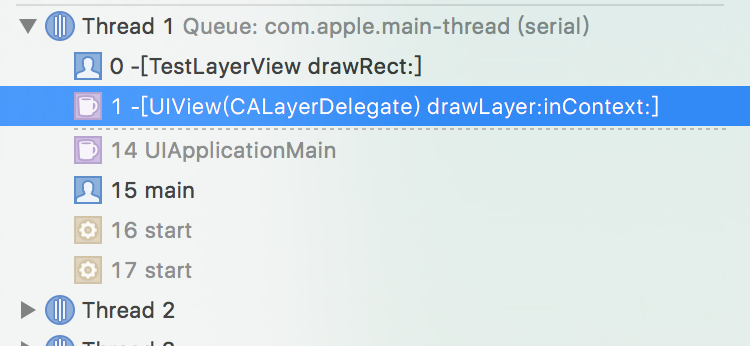
- UIView CALayer 这样设计的主要原因就是为了职责分离,拆分功能,方便代码的复用。通过 Core Animation 框架来负责可视内容的呈现,这样在 iOS 和 macOS 上都可以使用 Core Animation 进行渲染。与此同时,两个系统还可以根据交互规则的不同来进一步封装统一的控件,比如 iOS 有 UIKit 和 UIView,macOS 则是AppKit 和 NSView。
CALayer
1、CALayer 的 mask 属性
1 | /* A layer whose alpha channel is used as a mask to select between the |
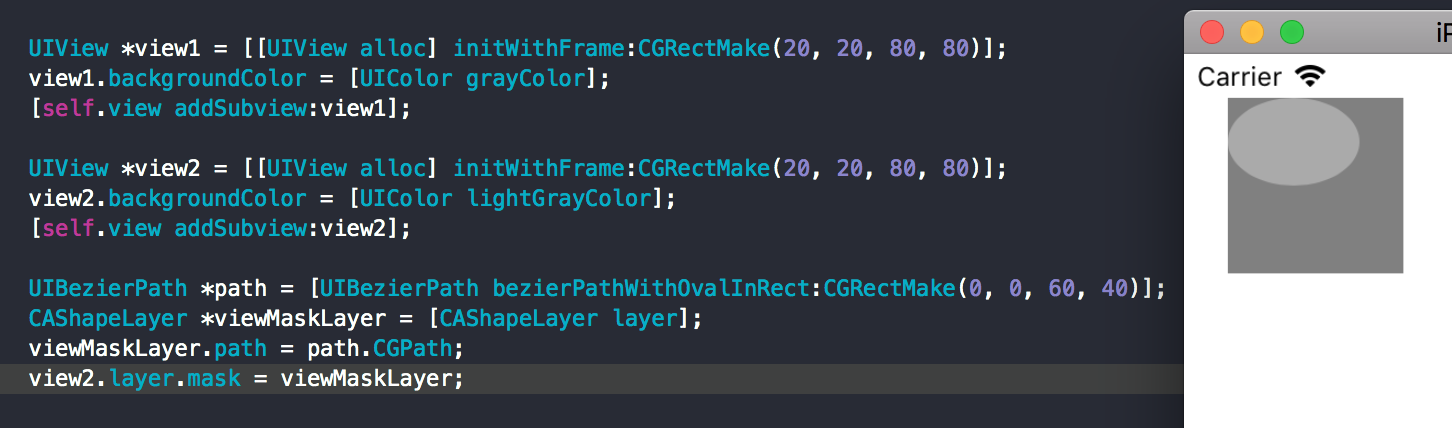
当设置某个 layer 的 mask 属性之后,只会显示 layer 和 mask 两者重叠的部分,其余部分不会显示,呈现透明。
如下面例子所示,为了方便观察,设置了两个 View 叠在一起,在view2 的 layer 上设置 mask 遮盖,遮盖为椭圆形,设置了之后只显示 view2 和 mask 的重叠部分,即椭圆部分,其余部分没有显示,而且是透明的,显示出了最底层的 view1。
我们可以利用 layer 的 mask 属性做些什么呢?
可以设置渐变色的字体,如下图所示: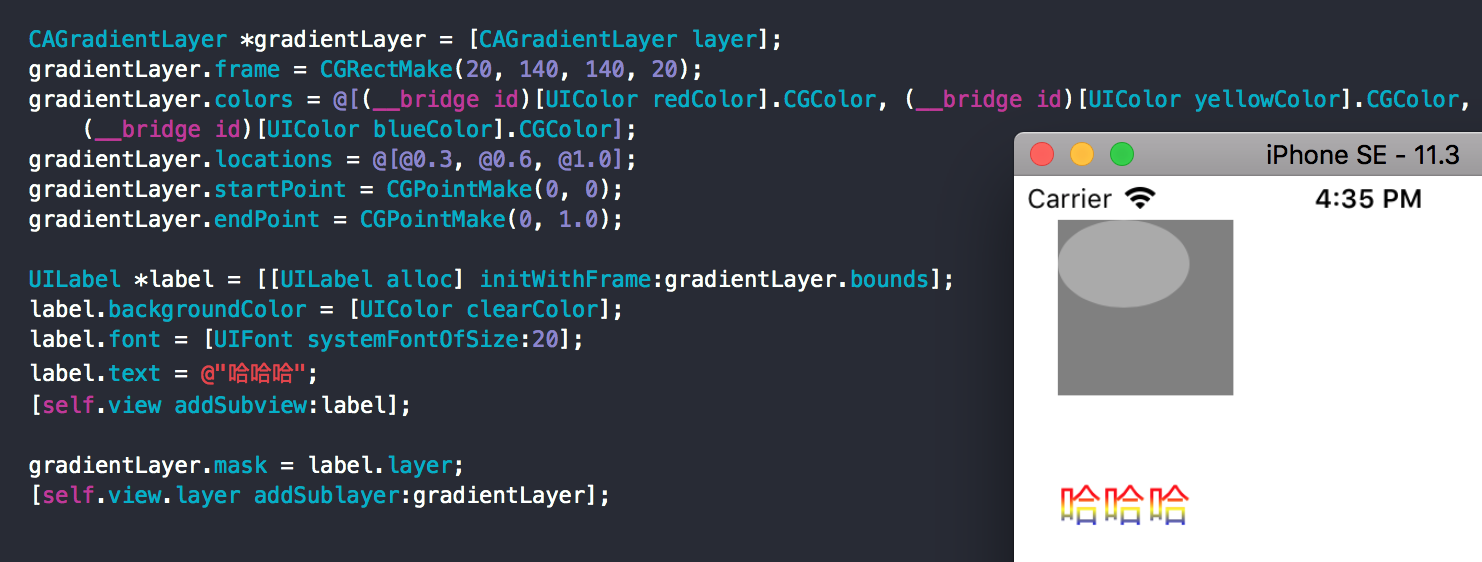
同样的可以设置渐变色的图片、剪切图片等。
也可以用来实现如 Twitter 的开屏动画效果:
2、 CALayer addAnimation
当你给一个 CALayer 添加动画的时候,动画其 实并没有改变这个 layer 的实际属性。取而代之的,系统会创建一个原始 layer 的拷贝。在文档中,苹果称这个原始 layer 为 Model Layer ,而这个复制的 layer 则被称为 Presentation Layer 。 Presentation Layer 的属性会随着动画的进度实时改变,而 Model Layer 中对应的属性则并不会改变。所以如果你想要获取动画中每个时刻的状态,请使用 layer 的 func presentationLayer 。
1 | /* Returns a copy of the layer containing all properties as they were |
前面提到隐式动画,修改 layer 的可进行动画的属性,显示的动画效果。那么对应的也就有显式动画,就是创建一个动画对象 CAAnimation 添加到对应的图层上。
有关动画的内容,请查看博客: iOS 动画
Reference
View Programming Guide for iOS
http://www.cnblogs.com/mjios/archive/2013/04/14/3020975.html
http://blog.csdn.net/weiwangchao_/article/details/7771538